3D V2X Data
DAIR-V2X Cooperative Dataset (DAIR-V2X-C) (from https://thudair.baai.ac.cn/cooptest) contains 18330 frames of infrastructure multi-modality data (point cloud & image), 20515 frames of vehicle multi-modality data (point cloud & image), 2D & 3D joint annotation files of raw data, calibration files, and timestamp files. DAIR-V2X-C can be used for Vehicle-Infrastructure Cooperative (VIC) 3D object detection to improve environmental perception performance in autonomous driving.
2D and 3D bounding boxes of the obstacle objects are provided as well as their category attributes, occlusion states, and truncated states in the annotation. There are total 10 object classes: Car, Truck, Van, Bus, Pedestrian, Cyclist, Tricyclist, Motorcyclist, Barrowlist, TrafficCone. 3D bounding box in the Lidar/Virtual Lidar coordinate system including height, width, length, x_loc, y_loc, z_loc, rotation.
DAIR-V2X Dependencies
Use DAIR-V2X to read the Lidar pcd file in cooperative sensing dataset. Install the following required packages
(mypy310) lkk@Alienware-LKKi7G8:~/Developer$ git clone https://github.com/klintan/pypcd.git
(mypy310) lkk@Alienware-LKKi7G8:~/Developer/pypcd$ python setup.py install
Create a new folder named “dairv2x” under “mydetector3d/datasets/dairv2x”
DAIR V2X Dataset Process
- DAIR V2X dataset is saved in ‘/data/cmpe249-fa22/DAIR-C’ folder. Based on ‘https://github.com/AIR-THU/DAIR-V2X/blob/main/docs/get_started.md’,
‘cooperative-vehicle-infrastructure’ folder as the follow three sub-folders: cooperative infrastructure-side vehicle-side
‘infrastructure-side’ and ‘vehicle-side’ has ‘image’, ‘velodyne’, ‘calib’, and ‘label’, and data_info.json as follows.
‘vehicle-side’ label is in Vehicle LiDAR Coordinate System, while ‘infrastructure-side’ label is in Infrastructure Virtual LiDAR Coordinate System
- ├── infrastructure-side # DAIR-V2X-C-I
- ├── image
├── {id}.jpg
- ├── velodyne
├── {id}.pcd
- ├── calib
- ├── camera_intrinsic
├── {id}.json
- ├── virtuallidar_to_world
├── {id}.json
- ├── virtuallidar_to_camera
├── {id}.json
- ├── label
- ├── camera # Labeled data in Infrastructure Virtual LiDAR Coordinate System fitting objects in image based on image frame time
├── {id}.json
- ├── virtuallidar # Labeled data in Infrastructure Virtual LiDAR Coordinate System fitting objects in point cloud based on point cloud frame time
├── {id}.json
├── data_info.json # Relevant index information of Infrastructure data
- The ‘cooperative’ folder contains the following files
- ├── cooperative # Coopetative Files
- ├── label_world # Vehicle-Infrastructure Cooperative (VIC) Annotation files
├── {id}.json
├── data_info.json # Relevant index information combined the Infrastructure data and the Vehicle data
- There are four data folders under root ‘/data/cmpe249-fa22/DAIR-C’:
‘cooperative-vehicle-infrastructure-vehicle-side-image’ folder contains all images (6digit_id.jpg) in vehicle side.
‘cooperative-vehicle-infrastructure-vehicle-side-velodyne’ folder contains all lidar files (6digit_id.pcd) in vehicle side.
‘cooperative-vehicle-infrastructure-infrastructure-side-image’ folder contains all images (6digit_id.jpg) in infrastructure side.
‘cooperative-vehicle-infrastructure-infrastructure-side-velodyne’ folder contains all lidar files (6digit_id.pcd) in infrastructure side.
Copy the split data (json files in ‘https://github.com/AIR-THU/DAIR-V2X/tree/main/data/split_datas’) to the data folder (‘/data/cmpe249-fa22/DAIR-C’)
Use ‘mydetector3d/tools/visual_utils/v2xvisualize.py’ to visualize the DAIR-C dataset. The vehicle Lidar view is
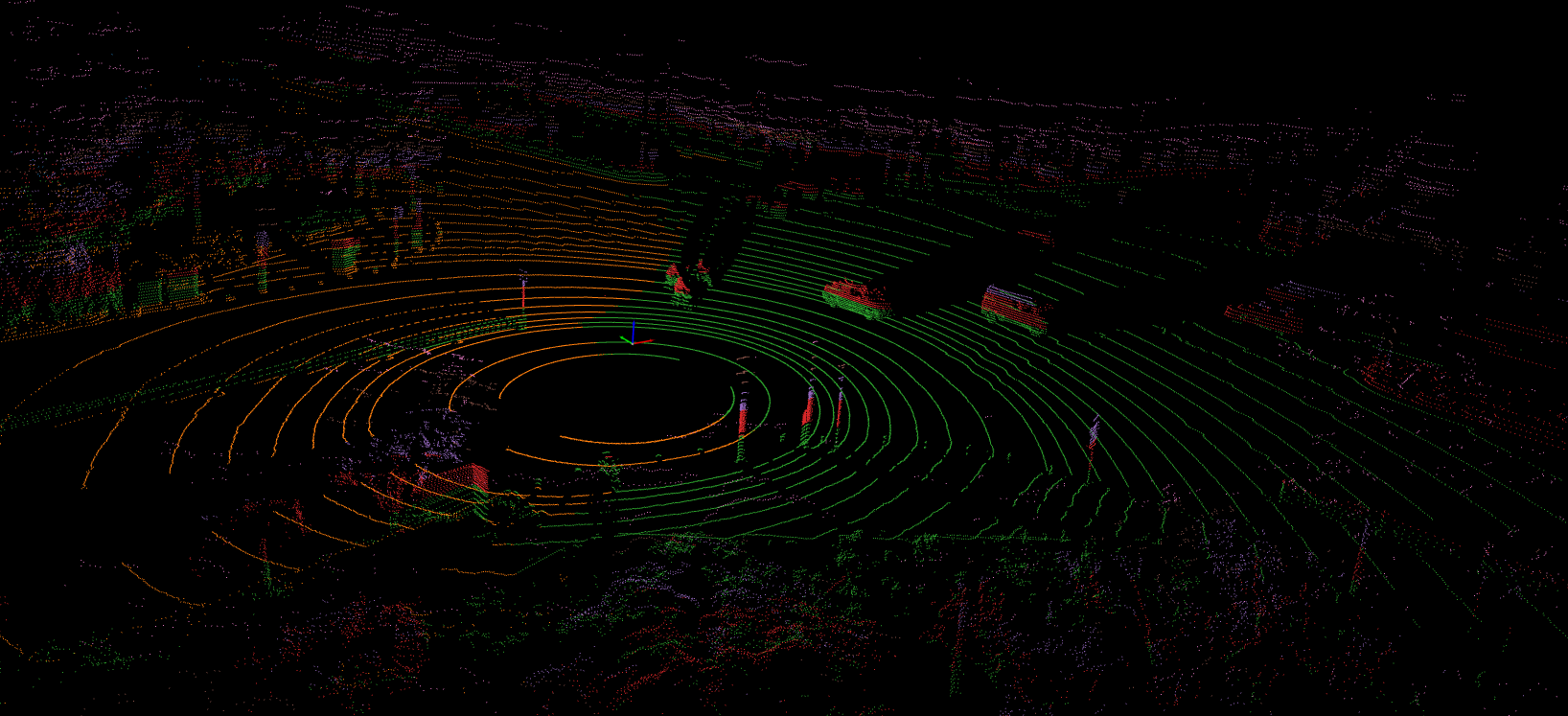
The color of the points is related to the height based on the following color map

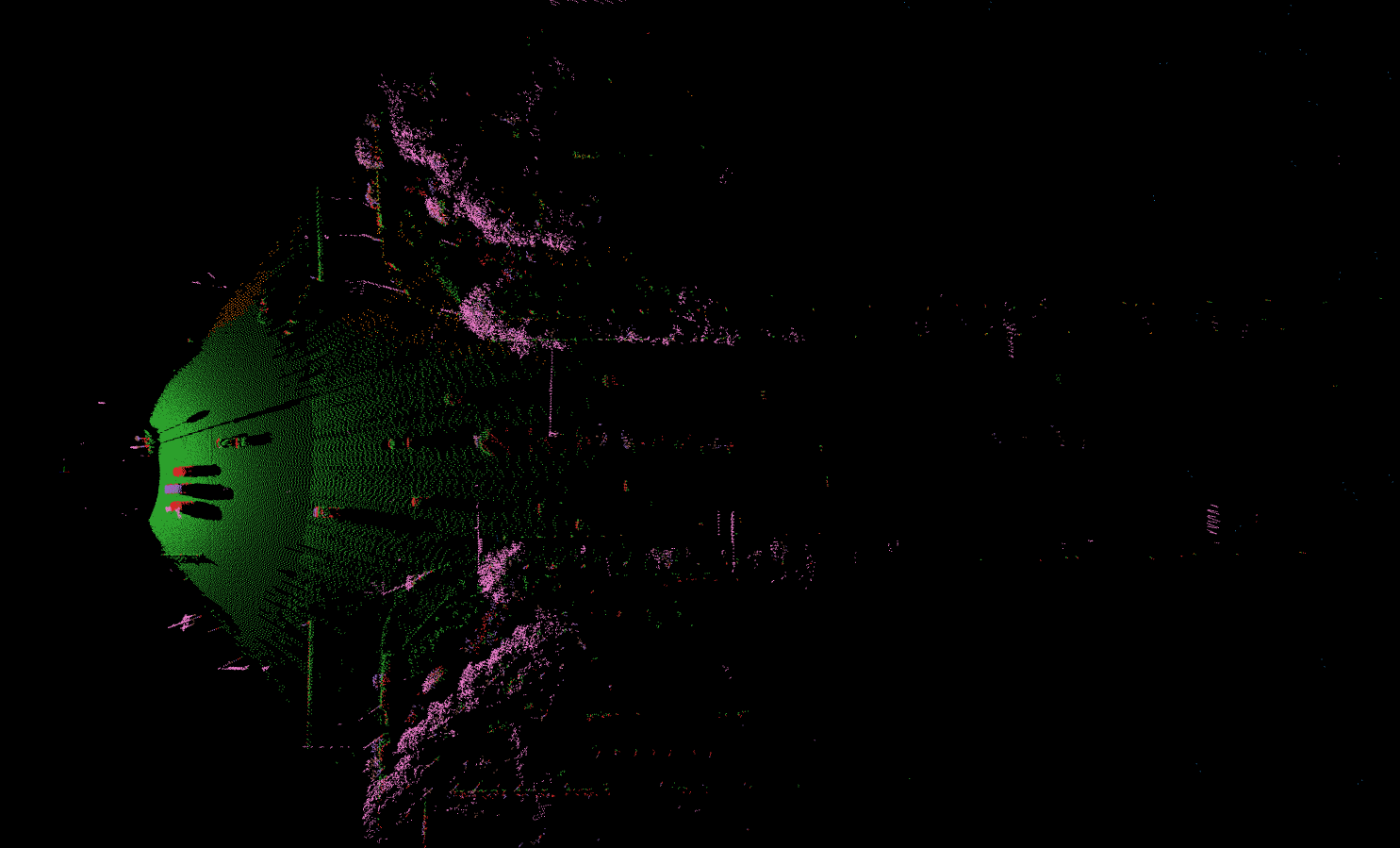
The top view of the Lidar from the Infrastructure is
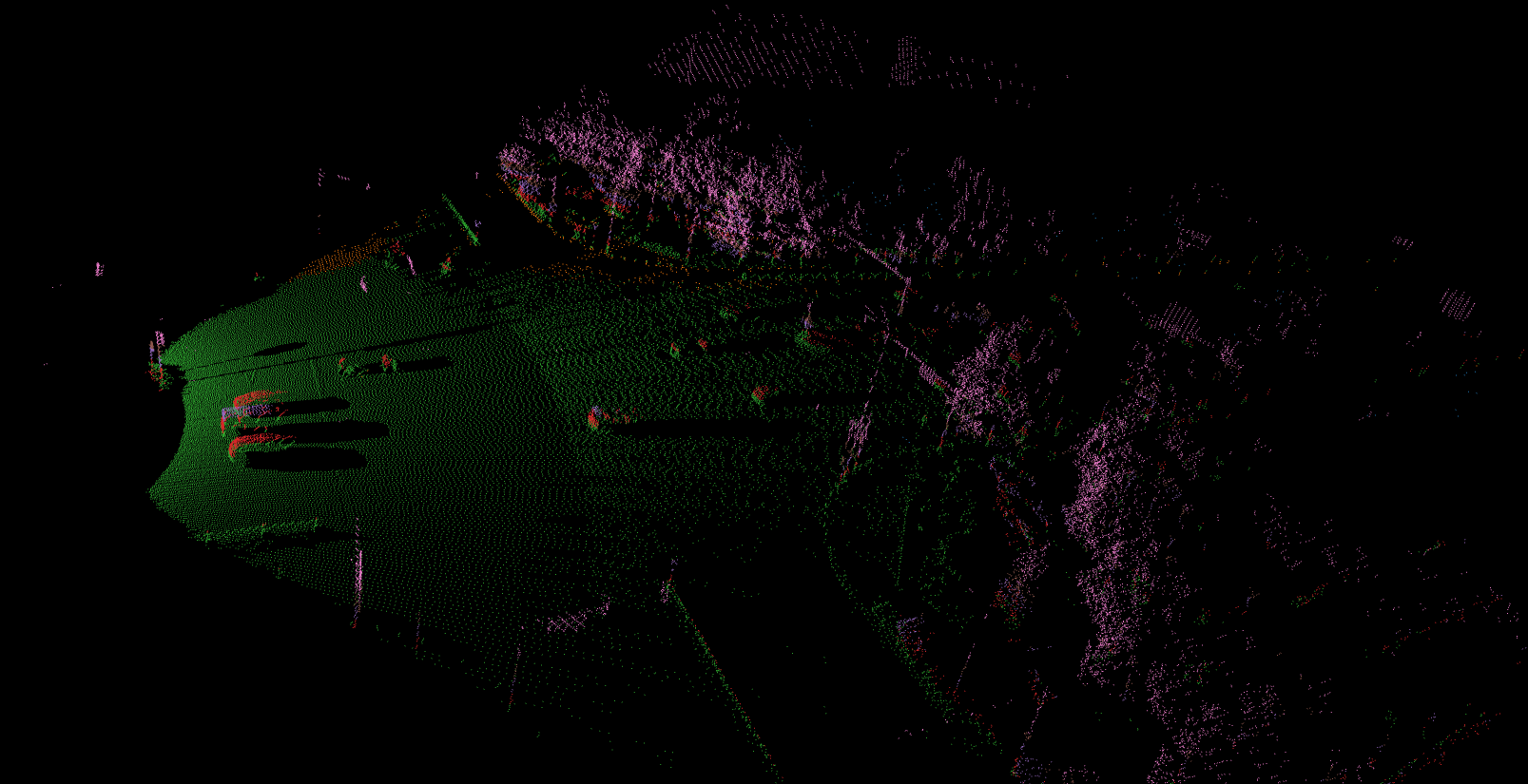
The 3D view of the Lidar from the Infrastructure is
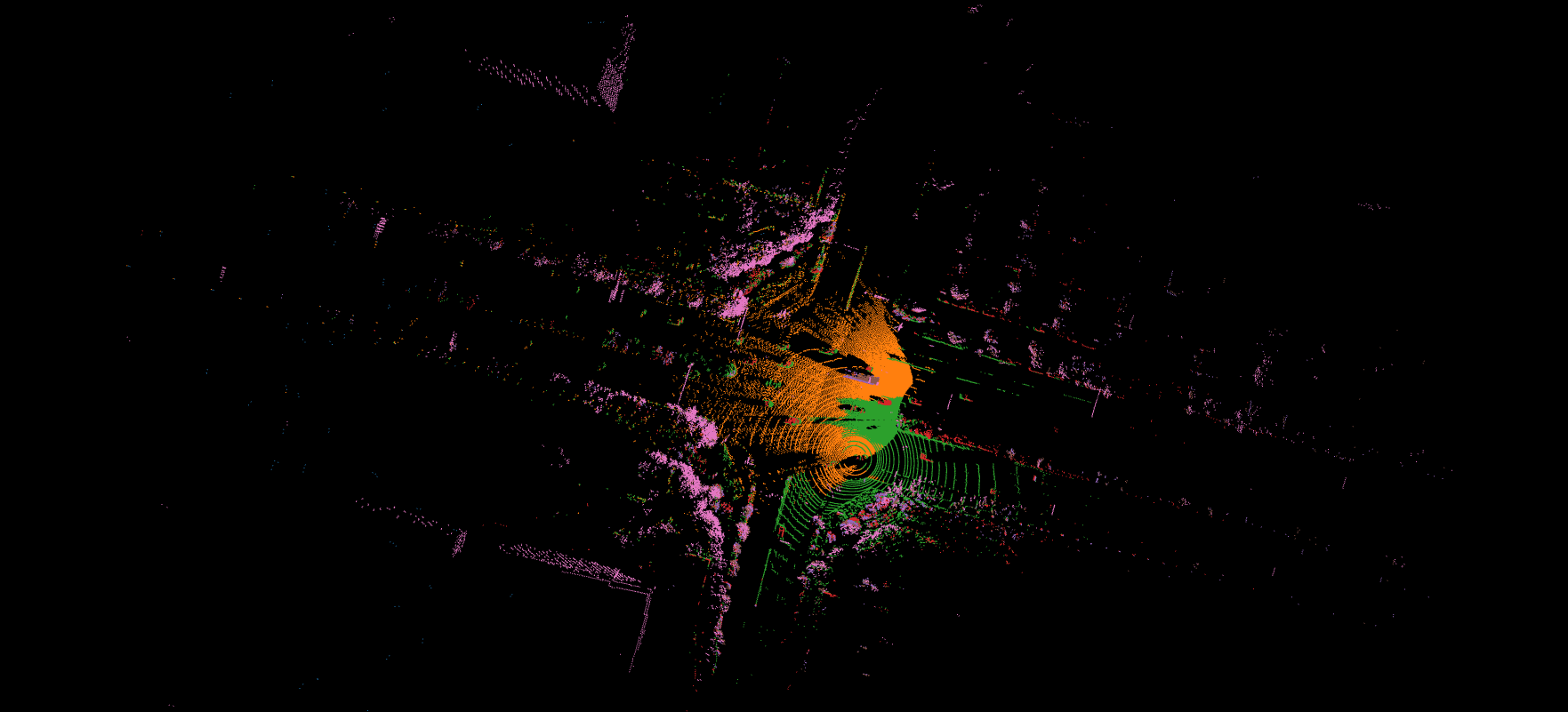
The fusion top view of the Lidar from the Infrastructure and Lidar from the vehicle is
The fusion 3D view of the Lidar from the Infrastructure and Lidar from the vehicle is

Convert the dataset to KITTI format
- In ‘mydetector3d/datasets/dairv2x/dair2kitti.py’, convert the vehicle-side data to Kitti format, set:
‘source-root=/data/cmpe249-fa22/DAIR-C/cooperative-vehicle-infrastructure/vehicle-side/’
‘target-root=/data/cmpe249-fa22/DAIR-C/single-vehicle-side-point-cloud-kitti’
‘sourcelidarfolder=/data/cmpe249-fa22/DAIR-C/cooperative-vehicle-infrastructure-vehicle-side-velodyne’
‘split-path=/data/cmpe249-fa22/DAIR-C/split_datas/single-vehicle-split-data.json’
‘sensor_view=vehicle’
- The conversion process involve the following major steps:
First create kitti folder, then call rawdata_copy to copy images from source to target (kitti folder).
‘mykitti_pcd2bin’: created new folder ‘/data/cmpe249-fa22/DAIR-C/single-vehicle-side-point-cloud-kitti/training/velodyne’, convert pcd files in ‘cooperative-vehicle-infrastructure-vehicle-side-velodyne’ to bin files in Kitti ‘velodyne’ folder. Get xyz and intensity from pcd file, divide intensity/255, save xyz and new intensity to kitti velodyne bin file.
- ‘gen_lidar2cam’, data_info=read_json(source_root/data_info.json), for each data in data_info,
read ‘calib/lidar_to_camera/id.json’ and get Tr_velo_to_cam (3,4)
- read labels_path ‘label/lidar/id.json’, for each label in labels,
get ‘h, w, l, x, y, z, yaw_lidar’, perform ‘z = z - h / 2’ get bottom_center
convert bottom_center to camera coordinate, get ‘alpha, yaw’ from get_camera_3d_8points
use convert_point to get ‘cam_x, cam_y, cam_z’, and set_label
Write labels to ‘tmp_file/label/lidar/id.json’, get ‘path_camera_intrinsic’ and ‘path_lidar_to_camera’ under calib folder, call gen_calib2kitti get kitti calibration
- use json2kitti to convert json label to kitti_label_root (/data/cmpe249-fa22/DAIR-C/single-vehicle-side-point-cloud-kitti/training/label_2/000000.txt)
change code in write_kitti_in_txt, save txt to ‘/data/cmpe249-fa22/DAIR-C/single-vehicle-side-point-cloud-kitti/training/label_2’
Generate calibration files,
The converted kitti folder is ‘/data/cmpe249-fa22/DAIR-C/single-vehicle-side-point-cloud-kitti’. The ‘testing folder is empty’, the image folder is not available in training, need to copy the images to training folder:
(mycondapy39) [010796032@coe-hpc2 training]$ ls
calib  label_2  velodyne
(mycondapy39) [010796032@coe-hpc2 training]$ mkdir image_2
(mycondapy39) [010796032@coe-hpc2 training]$ cd image_2/
(mycondapy39) [010796032@coe-hpc2 image_2]$ cp /data/cmpe249-fa22/DAIR-C/cooperative-vehicle-infrastructure-vehicle-side-image/* .
Using ‘mydetector3d/tools/visual_utils/v2xvisualize.py’ to visualize the converted kitti-format lidar
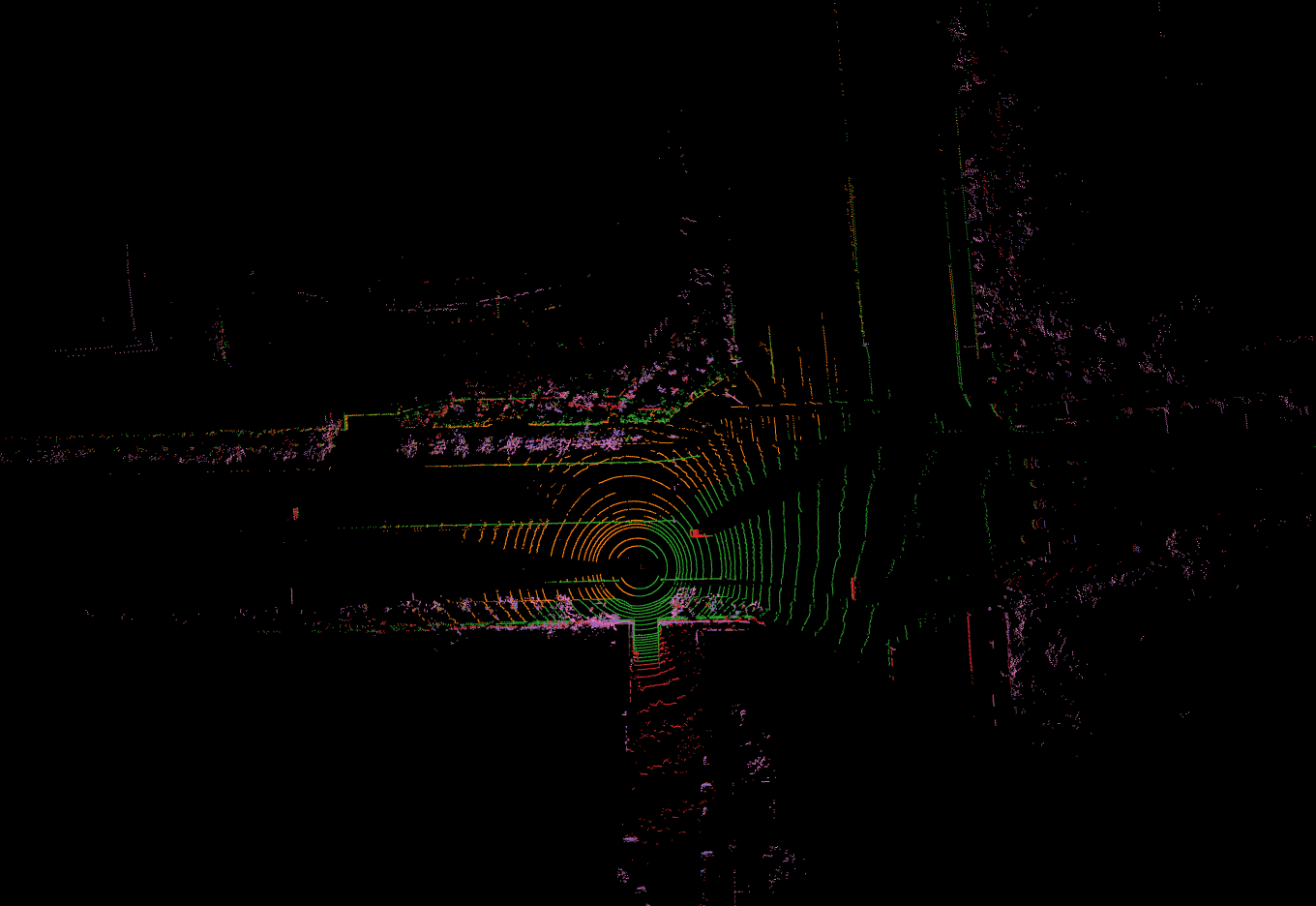
Using ‘VisUtils/waymokittiallvis2.py’, the visualization of the vehicle-side Lidar with 3D bounding boxes is shown here

The camera view and the projected Lidar to camera is shown here

- In ‘mydetector3d/datasets/dairv2x/dair2kitti.py’, convert the infrastructure-side data to Kitti format, set:
‘source-root=/data/cmpe249-fa22/DAIR-C/cooperative-vehicle-infrastructure/infrastructure-side/’
‘target-root=/data/cmpe249-fa22/DAIR-C/infrastructure-side-point-cloud-kitti’
‘sourcelidarfolder=/data/cmpe249-fa22/DAIR-C/cooperative-vehicle-infrastructure-infrastructure-side-velodyne’
‘split-path=/data/cmpe249-fa22/DAIR-C/split_datas/single-infrastructure-split-data.json’
‘sensor_view=infrastructure’
Created kitti folder “/data/cmpe249-fa22/DAIR-C/infrastructure-side-point-cloud-kitti”
(mycondapy39) [010796032@coe-hpc2 DAIR-C]$ cd infrastructure-side-point-cloud-kitti/
(mycondapy39) [010796032@coe-hpc2 infrastructure-side-point-cloud-kitti]$ ls
ImageSets  testing  training
(mycondapy39) [010796032@coe-hpc2 infrastructure-side-point-cloud-kitti]$ cd training/
(mycondapy39) [010796032@coe-hpc2 training]$ ls
calib  label_2  velodyne
(mycondapy39) [010796032@coe-hpc2 training]$ mkdir image_2 && cd image_2
(mycondapy39) [010796032@coe-hpc2 image_2]$ cp /data/cmpe249-fa22/DAIR-C/cooperative-vehicle-infrastructure-infrastructure-side-image/* .
Note
During the dair2kitti conversion process, classes of [“Truck”,”Van”,”Bus”,”Car”] has been converted to ‘Car’ in rewrite_label function. There are 7 classes left in the converted kitti data: Car, Pedestrian, Cyclist, Tricyclist, Motorcyclist, Barrowlist, TrafficCone. The current mydetector3d training will only pick the classes in the class_names list, i.e., other classes are ignored.
Use checklabelfiles function in dairkitti_dataset to see the class names in label
#single vehicle side total: 15285
{'Car': 133189, 'Motorcyclist': 18738, 'Cyclist': 11113, 'Tricyclist': 4173, 'Trafficcone': 106764, 'Pedestrian': 11434}
#infrastructure side total: 12424
{'Car': 160048, 'Motorcyclist': 28986, 'Trafficcone': 233529, 'Cyclist': 13228, 'Pedestrian': 24789, 'Barrowlist': 108}
Run replacelabelnames in dairkitti_dataset, to replace some of the class names, the final output contains four classes
(mycondapy39) [ 3DDepth]$ python mydetector3d/datasets/kitti/dairkitti_dataset.py
#single vihicle side
{'Car': 133189, 'Cyclist': 34024, 'Other': 106764, 'Pedestrian': 11434}
#infrastructure side
{'Car': 160048, 'Cyclist': 42214, 'Other': 233637, 'Pedestrian': 24789}
Infrastructure to Vehicle Transform
- Code ‘mydetector3d/datasets/dairv2x/point_cloud_i2v.py’ is used to transform the Lidar data from the Infrastructure view to the vehicle view.
- Read data_info (size 6617 array) from cooperative/data_info.json, each data in data_info contains the vehicle-side image/Lidar data path (e.g., 000289) and infrastructure-side image/Lidar data path (e.g., 007489)
‘infrastructure_image_path’, ‘infrastructure_pointcloud_path’, ‘vehicle_pointcloud_path’, ‘cooperative_label_path’, and ‘system_error_offset’
Find the matched i_data (infrastructure, 12424) and v_data (vehicle, 15285) dict
data_info (6617) is a sub-set of i_data and v_data
Get infrastructure-side virtuallidar2world path, get vehicle-side novatel2world, and lidar2novatel path; destination file name from infrastructure (007489)
call trans_pcd_i2v, read infrastructure lidar pcd, to virtuallidar to world transform, then world to novatel transform, then do novatel to lidar transform
save points to bin files in ‘/data/cmpe249-fa22/DAIR-C/early-fusion/velodyne/lidar_i2v/’
- In dairkitti_dataset, add matched infrastructure lidar points for fusion via “dataset_cfg.Early_Fusion” flag. The total number of matched vehicle and infrastructure lidar frame is less than the original lidar frames, the number of useful frames changes:
total lidar files: 15285
training sample list len, kitti_info len: 12228
i2vmap size: 6601
newkitti_infos: 5250
dataloader len: 1313 (batchsize=4)
The infrastructure lidar points has nan value. Modify the mask_points_by_range in common_utils.py, to remove ‘nan’ points and limit the range in Z-axis
mask = (points[:, 0] >= limit_range[0]) & (points[:, 0] <= limit_range[3]) & ~np.isnan(points[:, 0])\
          & (points[:, 1] >= limit_range[1]) & (points[:, 1] <= limit_range[4]) & ~np.isnan(points[:, 1])\
            & (points[:, 2] >= limit_range[2]) & (points[:, 2] <= limit_range[5]) & ~np.isnan(points[:, 2])\
            & ~np.isnan(points[:, 3])
I2V Fusion
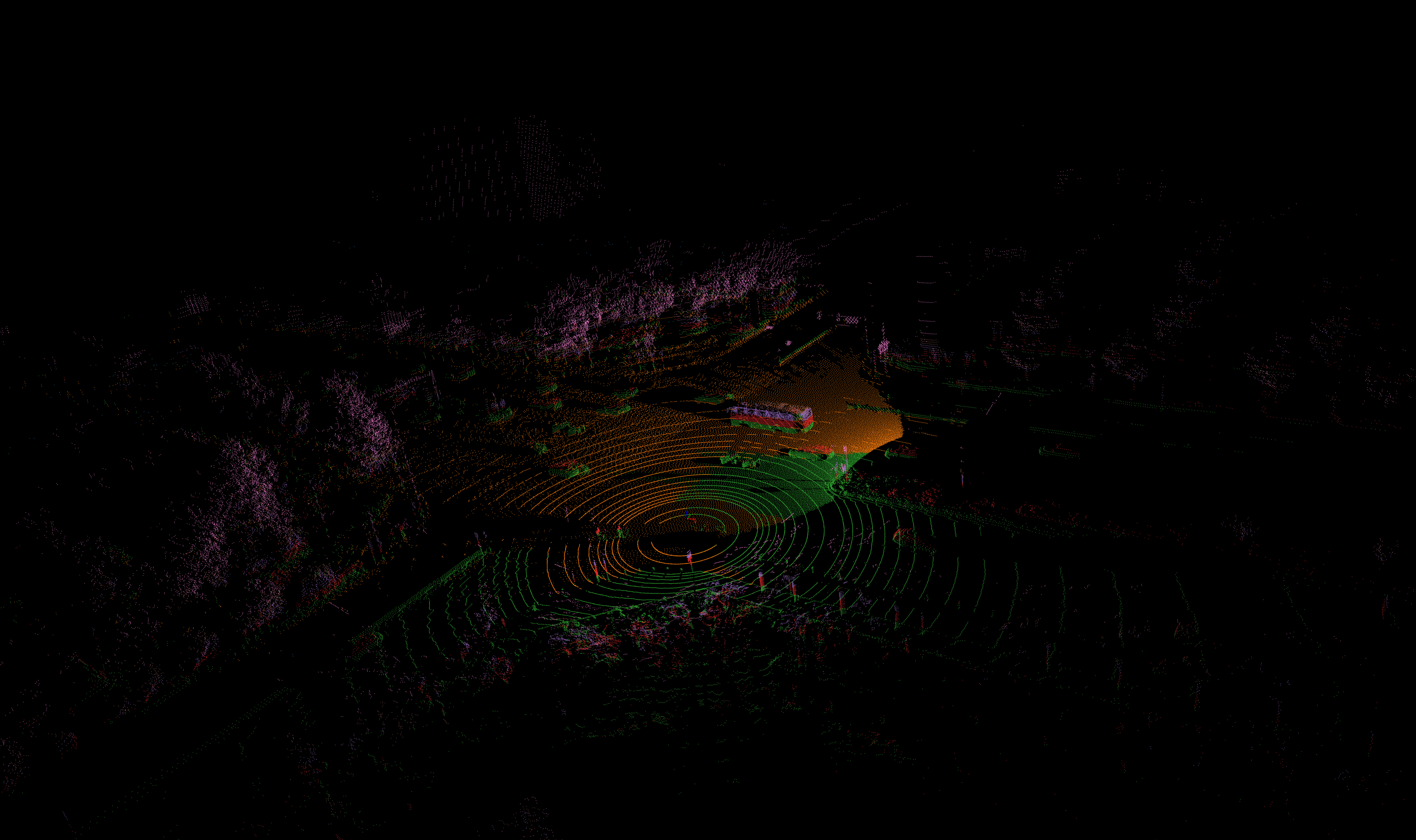
After the Lidar from the Infrastructure is converted to the vehicle view, we can perform raw data fusion. One example of the fusion result is shown here
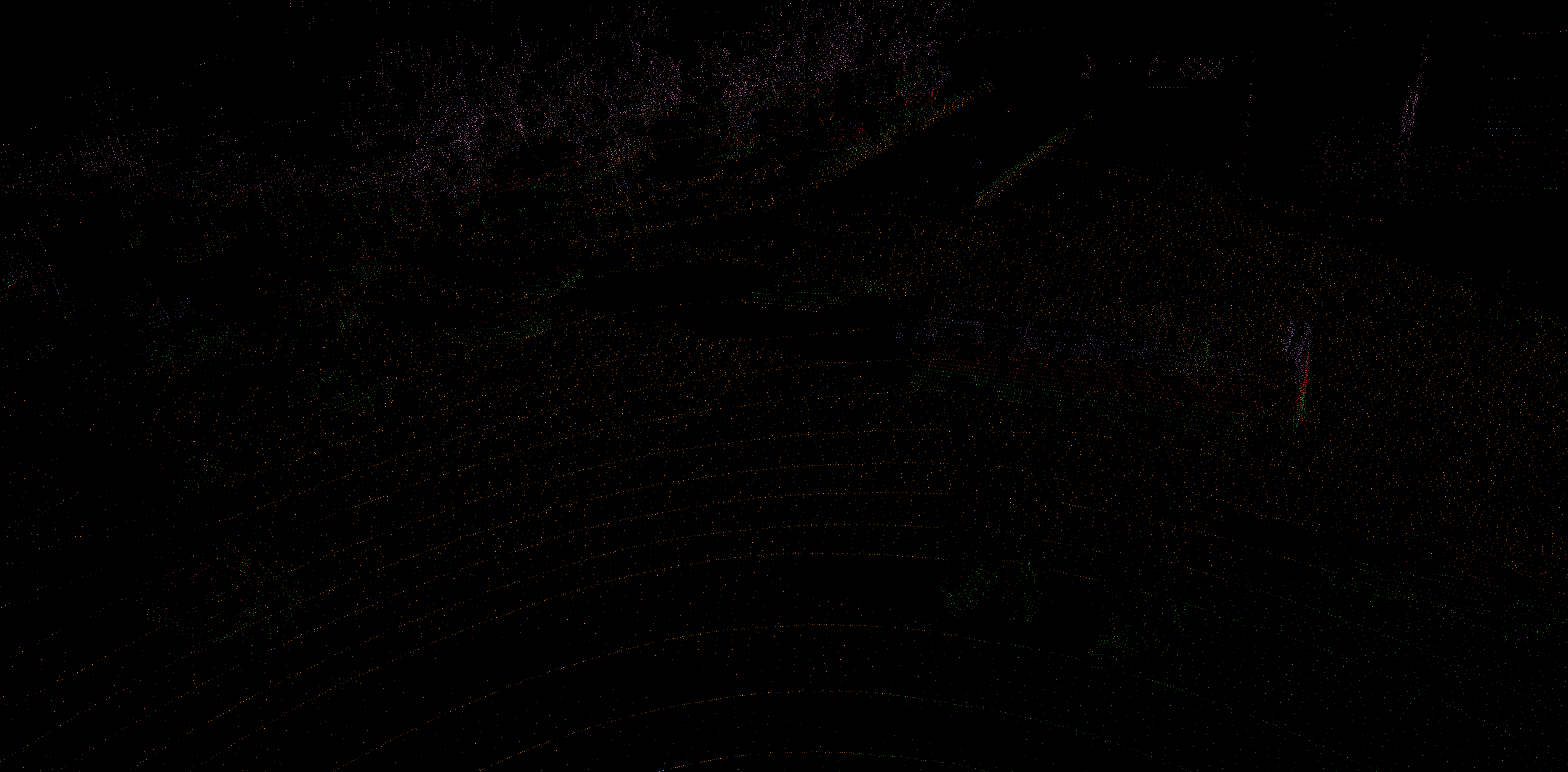
We can also check the details of the fusion
Prepare the dataset
- Run dairkitti_dataset.py to generate the split files, infos, and gt_database forthe vehicle side data.
run create_split option in dairkitti_dataset.py to create the split files (trainval.txt, train.txt, and val.txt) in ‘ImageSets’
run create_infos to generate ‘kitti_infos_xx.pkl’ and call create_groundtruth_database to generate the gt_database
$ dairkitti_dataset.py
gt_database sample: 12228/12228
Database Car: 106628
Database Motorcyclist: 14916
Database Cyclist: 8845
Database Trafficcone: 85790
Database Pedestrian: 9060
Database Tricyclist: 3286
$ dairkitti_dataset.py # after replacelabelnames
gt_database sample: 12228/12228
Database Car: 106628
Database Cyclist: 27047
Database Other: 85790
Database Pedestrian: 9060
---------------Data preparation Done---------------
$ ls /data/cmpe249-fa22/DAIR-C/single-vehicle-side-point-cloud-kitti/
gt_database  kitti_dbinfos_train.pkl  kitti_infos_train.pkl     kitti_infos_val.pkl  training
ImageSets    kitti_infos_test.pkl     kitti_infos_trainval.pkl  testing
Use checkinfopklfiles to check the pkl file
info['point_cloud'] = {'num_features': 4, 'lidar_idx': sample_idx}
info['image'] = {'image_idx': sample_idx, 'image_shape': self.get_image_shape(sample_idx)}
info['calib'] = calib_info
info['annos'] = annotations #['name'], ['truncated'], ['occluded'], ['alpha'], ['bbox']: (N,4), ['dimensions']: lhw(camera) format (N,3), ['location']: (N,3), ['rotation_y'], ['score'], ['difficulty'], ['index'], ['gt_boxes_lidar']: (N,7), ['num_points_in_gt']
Run dairkitti_dataset.py again to generate the split file, infos, and gt_database for the infrastructure data
gt_database sample: 9939/9939
Database Car: 127726
Database Motorcyclist: 23287
Database Cyclist: 10555
Database Trafficcone: 187382
Database Pedestrian: 19794
Database Barrowlist: 81
---------------Data preparation Done---------------
$ dairkitti_dataset.py # after replacelabelnames
gt_database sample: 9939/9939
Database Car: 127726
Database Cyclist: 33842
Database Other: 187463
Database Pedestrian: 19794
---------------Data preparation Done---------------
$ ls /data/cmpe249-fa22/DAIR-C/infrastructure-side-point-cloud-kitti/
gt_database  kitti_dbinfos_train.pkl  kitti_infos_train.pkl     kitti_infos_val.pkl  training
ImageSets    kitti_infos_test.pkl     kitti_infos_trainval.pkl  testing
Run test_dataset in dairkitti_dataset.py
total lidar files: 15285
Dataset infos len: 5249
One info keys:
  point_cloud
  image
  calib
  annos
dataloader len: 1313
annos keys:
  bbox
  location
  name
  truncated
  occluded
  alpha
  dimensions
  rotation_y
  score
  difficulty
  index
  gt_boxes_lidar
  num_points_in_gt
dataloader len: 1313
In the __getitem__ of dairkitti_dataset.py, gt_boxes_lidar is from ‘location’, ‘dimensions’, and ‘rotation_y’
loc, dims, rots = annos['location'], annos['dimensions'], annos['rotation_y']
gt_names = annos['name']
#create label [n,7] in camera coordinate boxes3d_camera: (N, 7) [x, y, z, l, h, w, r] in rect camera coords
gt_boxes_camera = np.concatenate([loc, dims, rots[..., np.newaxis]], axis=1).astype(np.float32)
gt_boxes_lidar = box_utils.boxes3d_kitti_camera_to_lidar(gt_boxes_camera, calib)
If this frame has no object, set gt_boxes_lidar empty:
if len(gt_names)==0:
     gt_boxes_lidar = np.zeros((0, 7))
Training and Evaluation
- Train the vehicle side data in mydetector3d
cfg_dataset=’mydetector3d/tools/cfgs/dairkitti_models/my3dmodel.yaml’, model is saved in ‘/data/cmpe249-fa22/Mymodels/dairkitti_models/my3dmodel/0511/ckpt/checkpoint_epoch_120.pth’/latest_model.pth
Evaluation results (filter out empty frame and classes not in the kittclasses) saved in /data/cmpe249-fa22/Mymodels/eval/dairkitti_models_my3dmodel_epochmodel/txtresults
Car AP@0.70, 0.70, 0.70:
bbox AP:22.9647, 20.1308, 19.5203
bev  AP:64.3469, 65.0784, 65.2450
3d   AP:56.6919, 52.6843, 51.5003
aos  AP:11.50, 10.21, 9.93
Pedestrian AP@0.50, 0.50, 0.50:
bbox AP:13.2223, 11.7845, 11.7958
bev  AP:53.5280, 48.6861, 47.9500
3d   AP:50.1386, 43.0288, 42.3967
aos  AP:11.34, 10.48, 10.48
Cyclist AP@0.50, 0.50, 0.50:
bbox AP:11.4549, 13.7494, 13.9884
bev  AP:22.5282, 30.7371, 30.5679
3d   AP:20.9868, 26.8777, 26.7182
aos  AP:5.08, 6.16, 6.28
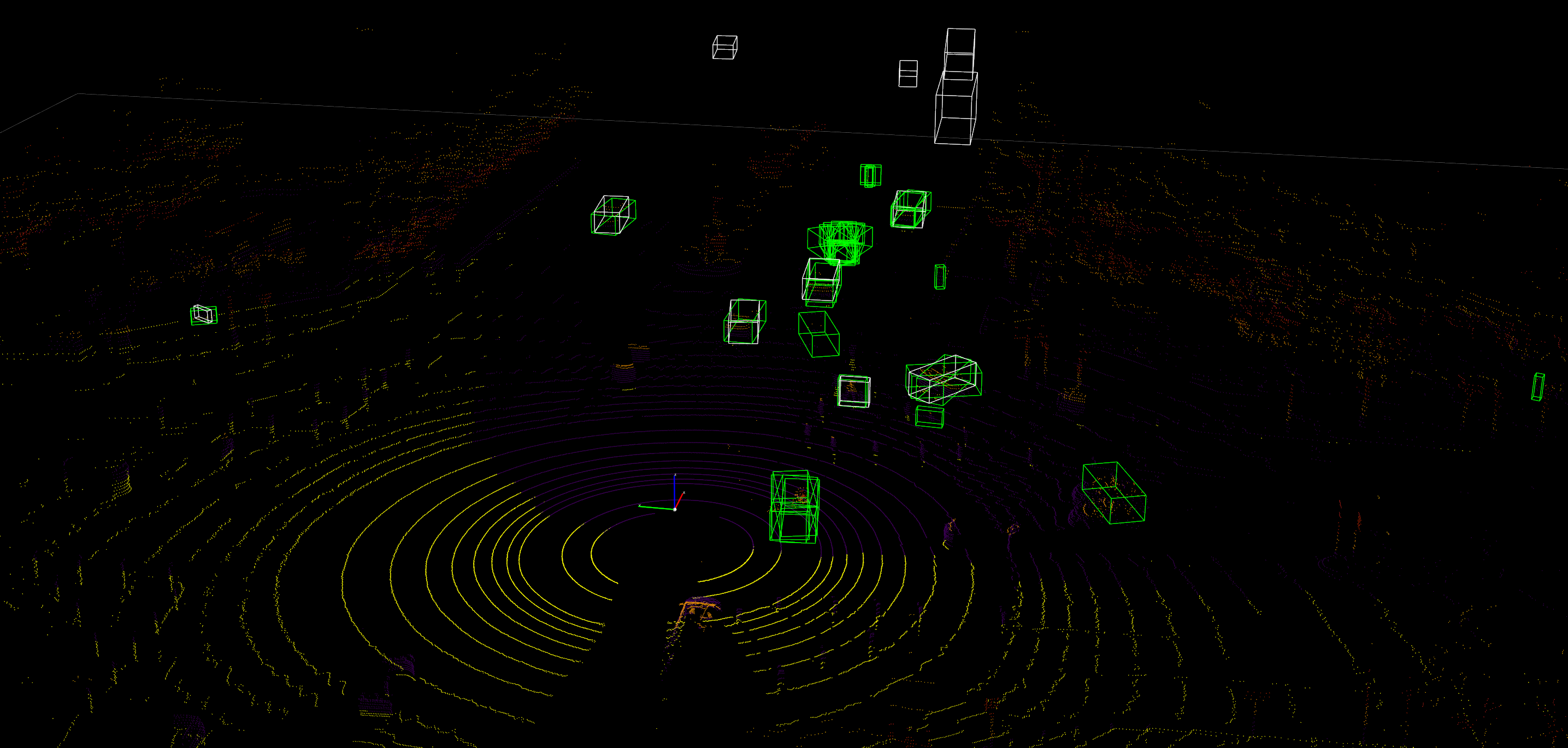
Run the evaluation and Lidar detection result is
- Train the infrastructure side data in mydetector3d
cfg_dataset=’mydetector3d/tools/cfgs/dairkitti_models/my3dmodel_infra.yaml’, model is saved in ‘/data/cmpe249-fa22/Mymodels/dairkitti_models/my3dmodel_infra/0512infra/ckpt/checkpoint_epoch_120.pth’/latest_model.pth
Evaluation results (filter out empty frame and classes not in the kittclasses) is 0
- Train the vehicle side data in mydetector3d after replacelabelnames, data_tag=’0513’ in GPU3
cfg_dataset=’mydetector3d/tools/cfgs/dairkitti_models/my3dmodel.yaml’, model is saved in ‘/data/cmpe249-fa22/Mymodels/dairkitti_models/my3dmodel/0513/ckpt/checkpoint_epoch_128.pth’
Evaluation results (filter out empty frame and classes not in the kittclasses) result is saved to /data/cmpe249-fa22/Mymodels/eval/dairkitti_models_my3dmodel_epochmodel/txtresults

Average predicted number of objects(3057 samples): 140.240
Finished detection: {'recall/roi_0.3': 0.0, 'recall/rcnn_0.3': 0.8291671061421088, 'recall/roi_0.5': 0.0, 'recall/rcnn_0.5': 0.671465738494533, 'recall/roi_0.7': 0.0, 'recall/rcnn_0.7': 0.31039271525507156, 'infer_time': 64.6671114404217, 'total_pred_objects': 428715, 'total_annos': 3057}
Car AP@0.70, 0.70, 0.70:
bbox AP:22.1671, 20.0946, 19.4177
bev  AP:67.3517, 68.4604, 68.3072
3d   AP:59.0924, 55.3433, 54.4236
aos  AP:10.59, 9.66, 9.35
Pedestrian AP@0.50, 0.50, 0.50:
bbox AP:12.6278, 12.0752, 12.0567
bev  AP:54.4139, 48.7479, 48.4298
3d   AP:51.6765, 43.4523, 43.0454
aos  AP:11.05, 10.60, 10.59
Cyclist AP@0.50, 0.50, 0.50:
bbox AP:22.8686, 22.5770, 22.6723
bev  AP:57.5935, 58.9456, 58.0578
3d   AP:54.5871, 53.7105, 52.8249
aos  AP:10.90, 10.70, 10.76
- Train the infrastructure side data in mydetector3d after replacelabelnames, data_tag=’0513infra’ in GPU2
cfg_dataset=’mydetector3d/tools/cfgs/dairkitti_models/my3dmodel_infra.yaml’, model is saved in ‘/data/cmpe249-fa22/Mymodels/dairkitti_models/my3dmodel_infra/0513infra/ckpt/checkpoint_epoch_128.pth’
Evaluation results (filter out empty frame and classes not in the kittclasses)
Average predicted number of objects(2485 samples): 85.658
Finished detection: {'recall/roi_0.3': 0.0, 'recall/rcnn_0.3': 0.626487269085486, 'recall/roi_0.5': 0.0, 'recall/rcnn_0.5': 0.5321511381078345, 'recall/roi_0.7': 0.0, 'recall/rcnn_0.7': 0.30276607556905394, 'infer_time': 68.14103801150797, 'total_pred_objects': 212861, 'total_annos': 2485}
Car AP@0.70, 0.70, 0.70:
bbox AP:23.7721, 18.4526, 18.3909
bev  AP:72.1776, 54.1334, 54.0990
3d   AP:70.9812, 53.2164, 53.0006
aos  AP:12.27, 9.49, 9.46
Pedestrian AP@0.50, 0.50, 0.50:
bbox AP:34.0897, 33.7425, 33.8436
bev  AP:36.2813, 34.1492, 34.2634
3d   AP:33.5470, 31.4709, 31.5814
aos  AP:17.07, 17.10, 17.16
Cyclist AP@0.50, 0.50, 0.50:
bbox AP:45.7644, 40.9651, 41.1427
bev  AP:63.7247, 52.2808, 52.0245
3d   AP:61.5907, 51.3137, 50.9824
aos  AP:23.37, 21.38, 21.48
- Train ‘mydetector3d/tools/cfgs/dairkitti_models/myvoxelnext.yaml’, ‘0514’ in GPU2
model is saved in “/data/cmpe249-fa22/Mymodels/dairkitti_models/myvoxelnext/0514/ckpt/latest_model.pth”
Evaluation result
Average predicted number of objects(3057 samples): 31.808
Finished detection: {'recall/roi_0.3': 0.0, 'recall/rcnn_0.3': 0.7716661392961361, 'recall/roi_0.5': 0.0, 'recall/rcnn_0.5': 0.5561298034665823, 'recall/roi_0.7': 0.0, 'recall/rcnn_0.7': 0.2290721794466125, 'infer_time': 69.39488329918557, 'total_pred_objects': 97238, 'total_annos': 3057}
Car AP@0.70, 0.70, 0.70:
bbox AP:19.0752, 19.6097, 17.7932
bev  AP:62.8174, 59.2183, 59.2639
3d   AP:54.4923, 42.8873, 42.1973
aos  AP:9.32, 10.69, 9.81
Pedestrian AP@0.50, 0.50, 0.50:
bbox AP:13.6921, 13.7351, 13.5351
bev  AP:60.5654, 51.0911, 51.0959
3d   AP:54.6608, 44.5123, 44.3112
aos  AP:4.40, 4.22, 4.12
Cyclist AP@0.50, 0.50, 0.50:
bbox AP:25.4608, 23.8307, 23.9123
bev  AP:68.0980, 61.8668, 61.2499
3d   AP:63.8344, 53.5704, 53.1876
aos  AP:12.79, 12.42, 12.43
- Train ‘mydetector3d/tools/cfgs/dairkitti_models/myvoxelnext_infra.yaml’, ‘0514’ in GPU2
model is saved in “/data/cmpe249-fa22/Mymodels/dairkitti_models/myvoxelnext_infra/0514/ckpt/checkpoint_epoch_128.pth”
Evaluation results (filter out empty frame and classes not in the kittclasses)
Average predicted number of objects(2485 samples): 32.017
Finished detection: {'recall/roi_0.3': 0.0, 'recall/rcnn_0.3': 0.6052164636469525, 'recall/roi_0.5': 0.0, 'recall/rcnn_0.5': 0.47907209649151455, 'recall/roi_0.7': 0.0, 'recall/rcnn_0.7': 0.26994546226445904, 'infer_time': 58.342159752677105, 'total_pred_objects': 79563, 'total_annos': 2485}
Car AP@0.70, 0.70, 0.70:
bbox AP:17.3477, 13.8236, 13.8174
bev  AP:72.1020, 54.0964, 54.0660
3d   AP:70.5954, 52.9636, 52.0443
aos  AP:9.42, 7.54, 7.53
Pedestrian AP@0.50, 0.50, 0.50:
bbox AP:37.3775, 32.6868, 36.6653
bev  AP:37.0466, 32.3041, 32.3247
3d   AP:32.7240, 30.7940, 30.7913
aos  AP:18.55, 16.16, 18.20
Cyclist AP@0.50, 0.50, 0.50:
bbox AP:48.6067, 43.8676, 38.4401
bev  AP:67.0253, 52.8233, 52.7723
3d   AP:60.3989, 52.1308, 51.9856
aos  AP:24.37, 22.89, 20.14
Train Fusion Models
- Config file=’mydetector3d/tools/cfgs/dairkitti_models/my3dmodel.yaml’
fusion training result is saved in “/data/cmpe249-fa22/Mymodels/dairkitti_models/my3dmodel/0515/ckpt/checkpoint_epoch_128.pth”
Evaluation result is saved to /data/cmpe249-fa22/Mymodels/eval/dairkitti_models_my3dmodel_epoch128/txtresults
Average predicted number of objects(1351 samples): 149.688
Finished detection: {'recall/roi_0.3': 0.0, 'recall/rcnn_0.3': 0.8347341135810227, 'recall/roi_0.5': 0.0, 'recall/rcnn_0.5': 0.6716675830649596, 'recall/roi_0.7': 0.0, 'recall/rcnn_0.7': 0.32884298169821696, 'infer_time': 90.00867711016413, 'total_pred_objects': 202228, 'total_annos': 1351}
Car AP@0.70, 0.70, 0.70:
bbox AP:21.5416, 20.4308, 19.6968
bev  AP:80.9123, 77.6669, 76.0540
3d   AP:74.1940, 64.9879, 63.3278
aos  AP:10.27, 9.86, 9.51
Pedestrian AP@0.50, 0.50, 0.50:
bbox AP:5.2918, 5.4963, 5.4031
bev  AP:51.3546, 41.8877, 41.4453
3d   AP:47.6064, 36.4693, 35.6941
aos  AP:2.62, 2.50, 2.50
Cyclist AP@0.50, 0.50, 0.50:
bbox AP:24.6030, 25.4492, 25.2234
bev  AP:72.4071, 69.5883, 68.2706
3d   AP:70.2918, 65.0319, 63.4337
aos  AP:10.83, 11.74, 11.65
- Config file=’mydetector3d/tools/cfgs/dairkitti_models/my3dmodel.yaml’, disable ‘Lidar_Fusion’ (use the small set of data with vehicle and infrastructure cooperation, but the Infrastructure Lidar data is not used)
fusion training result is saved in “/data/cmpe249-fa22/Mymodels/dairkitti_models/my3dmodel/0515nolidarfusion/ckpt/checkpoint_epoch_128.pth”
Average predicted number of objects(1351 samples): 207.742
Finished detection: {'recall/roi_0.3': 0.0, 'recall/rcnn_0.3': 0.7967166758306496, 'recall/roi_0.5': 0.0, 'recall/rcnn_0.5': 0.6008561778336344, 'recall/roi_0.7': 0.0, 'recall/rcnn_0.7': 0.24161495562013982, 'infer_time': 110.38009090536445, 'total_pred_objects': 280659, 'total_annos': 1351}
Car AP@0.70, 0.70, 0.70:
bbox AP:10.7006, 12.1243, 11.8581
bev  AP:38.5465, 48.0391, 48.7998
3d   AP:29.6970, 35.0667, 34.8825
aos  AP:5.21, 5.99, 5.87
Pedestrian AP@0.50, 0.50, 0.50:
bbox AP:5.0162, 5.1991, 5.0259
bev  AP:43.5028, 39.1187, 38.8207
3d   AP:39.1552, 33.4822, 33.0070
aos  AP:2.56, 2.55, 2.48
Cyclist AP@0.50, 0.50, 0.50:
bbox AP:18.4654, 21.0681, 20.9794
bev  AP:46.5717, 52.7549, 51.6042
3d   AP:42.2533, 46.8303, 45.8203
aos  AP:8.82, 10.27, 10.24
- Config file=’mydetector3d/tools/cfgs/dairkitti_models/my3dmodel2.yaml’, modify the MAX_POINTS_PER_VOXEL and add more filters in VFE and MAP_TO_BEV (Num point features after VFE is 128).
Training results saved in “/data/cmpe249-fa22/Mymodels/dairkitti_models/my3dmodel2/0516/ckpt/checkpoint_epoch_128.pth”
Result is saved to /data/cmpe249-fa22/Mymodels/eval/dairkitti_models_my3dmodel2_0516/txtresults
Average predicted number of objects(1351 samples): 43.711
Finished detection: {'recall/roi_0.3': 0.0, 'recall/rcnn_0.3': 0.7898436886340429, 'recall/roi_0.5': 0.0, 'recall/rcnn_0.5': 0.6265807870552196, 'recall/roi_0.7': 0.0, 'recall/rcnn_0.7': 0.3065352289686592, 'infer_time': 81.65811786990194, 'total_pred_objects': 59054, 'total_annos': 1351}
Car AP@0.70, 0.70, 0.70:
bbox AP:19.8701, 18.5302, 17.3661
bev  AP:80.1939, 75.9804, 75.4748
3d   AP:72.7171, 64.0618, 62.0966
aos  AP:9.62, 9.11, 8.54
Pedestrian AP@0.50, 0.50, 0.50:
bbox AP:5.8957, 5.8491, 5.7967
bev  AP:54.4264, 44.6858, 43.9075
3d   AP:49.6394, 37.7629, 37.1243
aos  AP:4.05, 3.05, 3.00
Cyclist AP@0.50, 0.50, 0.50:
bbox AP:23.4062, 24.6677, 24.6010
bev  AP:69.0258, 67.8017, 66.6623
3d   AP:67.5499, 62.6145, 61.3039
aos  AP:10.10, 11.29, 11.28
- Config file=’mydetector3d/tools/cfgs/dairkitti_models/myvoxelnext.yaml’
Training results saved in “/data/cmpe249-fa22/Mymodels/dairkitti_models/myvoxelnext/0516/ckpt/checkpoint_epoch_128.pth”
Result is saved to /data/cmpe249-fa22/Mymodels/eval/dairkitti_models_myvoxelnext_0516/txtresults
Average predicted number of objects(1351 samples): 31.134
Finished detection: {'recall/roi_0.3': 0.0, 'recall/rcnn_0.3': 0.80944152069751, 'recall/roi_0.5': 0.0, 'recall/rcnn_0.5': 0.6190008640326762, 'recall/roi_0.7': 0.0, 'recall/rcnn_0.7': 0.308381116958605, 'infer_time': 88.02486030307747, 'total_pred_objects': 42062, 'total_annos': 1351}
Car AP@0.70, 0.70, 0.70:
bbox AP:15.5940, 15.5772, 14.6006
bev  AP:86.8837, 80.1227, 79.6426
3d   AP:82.6152, 69.4716, 68.6104
aos  AP:7.81, 7.63, 7.17
Pedestrian AP@0.50, 0.50, 0.50:
bbox AP:13.4294, 14.2041, 14.0227
bev  AP:58.7801, 50.2011, 50.2017
3d   AP:50.6428, 43.2261, 42.5002
aos  AP:7.54, 7.82, 7.72
Cyclist AP@0.50, 0.50, 0.50:
bbox AP:15.1565, 24.4733, 24.3833
bev  AP:82.4833, 77.6059, 76.9294
3d   AP:76.3442, 72.5238, 68.6905
aos  AP:6.75, 12.61, 12.57
- Train ‘mydetector3d/tools/cfgs/dairkitti_models/my3dmodelv2.yaml’ in ‘0517’
Model saved in ‘/data/cmpe249-fa22/Mymodels/dairkitti_models/my3dmodelv2/0517/ckpt/latest_model.pth’
Result is saved to /data/cmpe249-fa22/Mymodels/eval/dairkitti_models_my3dmodelv2_0517/txtresults
Average predicted number of objects(1351 samples): 137.924
Finished detection: {'recall/roi_0.3': 0.0, 'recall/rcnn_0.3': 0.8374440342471133, 'recall/roi_0.5': 0.0, 'recall/rcnn_0.5': 0.6819967009661456, 'recall/roi_0.7': 0.0, 'recall/rcnn_0.7': 0.3456916188830414, 'infer_time': 135.41728434478037, 'total_pred_objects': 186335, 'total_annos': 1351}
Car AP@0.70, 0.70, 0.70:
bbox AP:24.1560, 22.3951, 21.0895
bev  AP:81.0365, 78.1048, 77.8612
3d   AP:75.3015, 67.5120, 65.1881
aos  AP:11.44, 10.69, 10.06
Pedestrian AP@0.50, 0.50, 0.50:
bbox AP:8.9119, 8.3005, 8.1552
bev  AP:58.9776, 48.5291, 48.3065
3d   AP:53.7915, 42.8447, 42.5377
aos  AP:4.01, 3.68, 3.62
Cyclist AP@0.50, 0.50, 0.50:
bbox AP:20.5838, 23.2865, 23.4181
bev  AP:72.0387, 71.0033, 70.3623
3d   AP:69.2169, 66.7102, 65.5677
aos  AP:9.78, 11.46, 11.55
- Train ‘mydetector3d/tools/cfgs/dairkitti_models/my3dmodelv2.yaml’ in ‘0518’ (set compress_raito=8)
Save latest model to /data/cmpe249-fa22/Mymodels/dairkitti_models/my3dmodelv2/0518/ckpt/latest_model
‘mydetector3d/tools/cfgs/dairkitti_models/my3dmodelv2_compressor.yaml’
Result is saved to /data/cmpe249-fa22/Mymodels/eval/dairkitti_models_my3dmodelv2_compressor_0518conv/txtresults
Average predicted number of objects(1351 samples): 140.478
Finished detection: {'recall/roi_0.3': 0.0, 'recall/rcnn_0.3': 0.8368549210588327, 'recall/roi_0.5': 0.0, 'recall/rcnn_0.5': 0.6812897651402089, 'recall/roi_0.7': 0.0, 'recall/rcnn_0.7': 0.3413714555023172, 'infer_time': 142.1786172855535, 'total_pred_objects': 189786, 'total_annos': 1351}
Car AP@0.70, 0.70, 0.70:
bbox AP:25.1129, 21.7680, 20.5236
bev  AP:80.5588, 77.6377, 77.2339
3d   AP:75.1016, 66.9202, 64.2415
aos  AP:11.33, 9.80, 9.22
Pedestrian AP@0.50, 0.50, 0.50:
bbox AP:7.7580, 7.5677, 7.2327
bev  AP:55.1335, 45.3889, 44.7832
3d   AP:51.8617, 40.2456, 39.6877
aos  AP:3.80, 3.75, 3.73
Cyclist AP@0.50, 0.50, 0.50:
bbox AP:20.0710, 24.9068, 24.4860
bev  AP:71.1439, 71.2478, 70.2554
3d   AP:68.5503, 66.5361, 65.5088
aos  AP:8.86, 11.64, 11.43
- Train ‘mydetector3d/tools/cfgs/dairkitti_models/my3dmodelv2.yaml’ in ‘0518conv’ (added one conv(384,64) in my3dmodelv2.py)
Save latest model to /data/cmpe249-fa22/Mymodels/dairkitti_models/my3dmodelv2/0518conv/ckpt/latest_model
Add GET_ITEM_LIST: [“points”, “images”]
Result is saved to /data/cmpe249-fa22/Mymodels/eval/dairkitti_models_my3dmodelv2_0518conv/txtresults
Average predicted number of objects(1351 samples): 137.685
Finished detection: {'recall/roi_0.3': 0.0, 'recall/rcnn_0.3': 0.8315136281517556, 'recall/roi_0.5': 0.0, 'recall/rcnn_0.5': 0.6637734663419999, 'recall/roi_0.7': 0.0, 'recall/rcnn_0.7': 0.3284502395726966, 'infer_time': 137.0744020981196, 'total_pred_objects': 186013, 'total_annos': 1351}
Car AP@0.70, 0.70, 0.70:
bbox AP:19.3310, 20.6579, 19.9613
bev  AP:79.5797, 77.2212, 75.6694
3d   AP:73.9871, 64.8375, 63.0783
aos  AP:9.29, 10.41, 10.06
Pedestrian AP@0.50, 0.50, 0.50:
bbox AP:9.1300, 7.6350, 7.3503
bev  AP:52.3427, 43.5257, 42.1801
3d   AP:48.3685, 37.4823, 37.0189
aos  AP:5.03, 4.23, 4.17
Pedestrian AP@0.50, 0.50, 0.50:
bbox AP:9.1300, 7.6350, 7.3503
bev  AP:52.3427, 43.5257, 42.1801
3d   AP:48.3685, 37.4823, 37.0189
aos  AP:5.03, 4.23, 4.17
Add BEV Fusion Process
- File “/lts/home/010796032/3DObject/3DDepth/mydetector3d/datasets/processor/data_processor.py”, line 250, in image_calibrate
img_process_infos = data_dict[‘img_process_infos’]
- File “/lts/home/010796032/3DObject/3DDepth/mydetector3d/datasets/processor/data_processor.py”, line 244, in image_normalize
data_dict[“camera_imgs”] = [compose(img) for img in data_dict[“camera_imgs”]]
- img_bev = batch_dict[‘spatial_features_img’]#[1, 80, 180, 180]
lidar_bev = batch_dict[‘spatial_features’]#[6, 128, 250, 250] cat_bev = torch.cat([img_bev,lidar_bev],dim=1)
- MeanVFE
Input: voxel_features([220121, 10, 4]), voxel_num_points([220121]) = batch_dict[‘voxels’], batch_dict[‘voxel_num_points’]
Output; batch_dict[‘voxel_features’] = points_mean.contiguous() #[220121, 4]
- VoxelResBackBone8x
Input: voxel_features([220121, 4]), voxel_coords([220121, 4]) = batch_dict[‘voxel_features’], batch_dict[‘voxel_coords’]
Output: batch_dict: ‘encoded_spconv_tensor’: out([1, 250, 250]), ‘encoded_spconv_tensor_stride’: 8, ‘multi_scale_3d_features’
- HeightCompression
Input: encoded_spconv_tensor = batch_dict[‘encoded_spconv_tensor’] #Sparse
Output: batch_dict[‘spatial_features’] = spatial_features #[6, 128, 250, 250], batch_dict[‘spatial_features_stride’]=8
- SwinTransformer
Input: x = batch_dict[‘camera_imgs’] #[6, 1, 3, 256, 704]
Out: batch_dict[‘image_features’] = outs #3 items: [6, 192, 32, 88], [6, 384, 16, 44], [6, 768, 8, 22]
- GeneralizedLSSFPN
inputs = batch_dict[‘image_features’]
Output: batch_dict[‘image_fpn’] = tuple(outs) #2 items: [6, 256, 32, 88], [6, 256, 16, 44]
- DepthLSSTransform (lists images into 3D and then splats onto bev features, from https://github.com/mit-han-lab/bevfusion/)
x = batch_dict[‘image_fpn’] #img=[1, 6, 256, 32, 88]
Output: batch_dict[‘spatial_features_img’] = x #[1, 80, 180, 180]
- ConvFuser
Input: img_bev = batch_dict[‘spatial_features_img’]#[1, 80, 180, 180], lidar_bev = batch_dict[‘spatial_features’]#[6, 128, 250, 250]* Output: batch_dict[‘spatial_features’] = mm_bev
OpenCOOD
Use OpenCOOD and ref installation to setup the V2V cooperative 3D object detection framework (based on OpenPCDet) in Newalienware machine (with RTX3090)
(mycondapy39) lkk68@NEWALIENWARE C:\Users\lkk68\Documents\Developer>git clone https://github.com/DerrickXuNu/OpenCOOD.git
(mycondapy39) lkk68@NEWALIENWARE C:\Users\lkk68\Documents\Developer\OpenCOOD>python setup.py develop
#error: scipy 1.5.4 is installed but scipy>=1.8 is required by {'scikit-image'}
$ pip install scipy -U
  ERROR: pip's dependency resolver does not currently take into account all the packages that are installed. This behaviour is the source of the following dependency conflicts.
opencood 0.1.0 requires matplotlib~=3.3.3, but you have matplotlib 3.7.1 which is incompatible.
opencood 0.1.0 requires opencv-python~=4.5.1.48, but you have opencv-python 4.7.0.72 which is incompatible.
opencood 0.1.0 requires scipy~=1.5.4, but you have scipy 1.10.1 which is incompatible.
Successfully installed scipy-1.10.1
opv2v dataset is downloaded in ‘/data/cmpe249-fa22/OpenCOOD/opv2v_data_dumping’, but there are errors in the dataset: “unzip: cannot find zipfile directory in one of train.zip”